

Ingredients · Basics
Add ingredients and supplier prices
Give an ingredient a price once and every recipe that uses it can be costed from that price. This guide takes you from a new ingredient to a cost per kilo, litre or piece.
How ingredients work
An ingredient in Cuisson has two parts:
- The ingredient is the thing you cook with: plain flour, butter, eggs. It holds the name, category and allergens, and it's what your recipes use.
- A variant is one way you buy it: the supplier, the pack size and the price. Cuisson works out the cost per unit from the variant.
An ingredient with no variant has no price, so recipes that use it can't show a full cost. Adding the ingredient is the first half of the job. Adding its variant is the second.
You can give one ingredient several variants, such as the same flour from two suppliers, or in a 1.5 kg bag and a 16 kg sack. One of them is the default, and that's the one Cuisson uses to cost new recipe lines.
Before you start
Have a recent invoice or a supplier price list to hand. You'll need the pack size and what you pay for one pack.
1. Add the ingredient
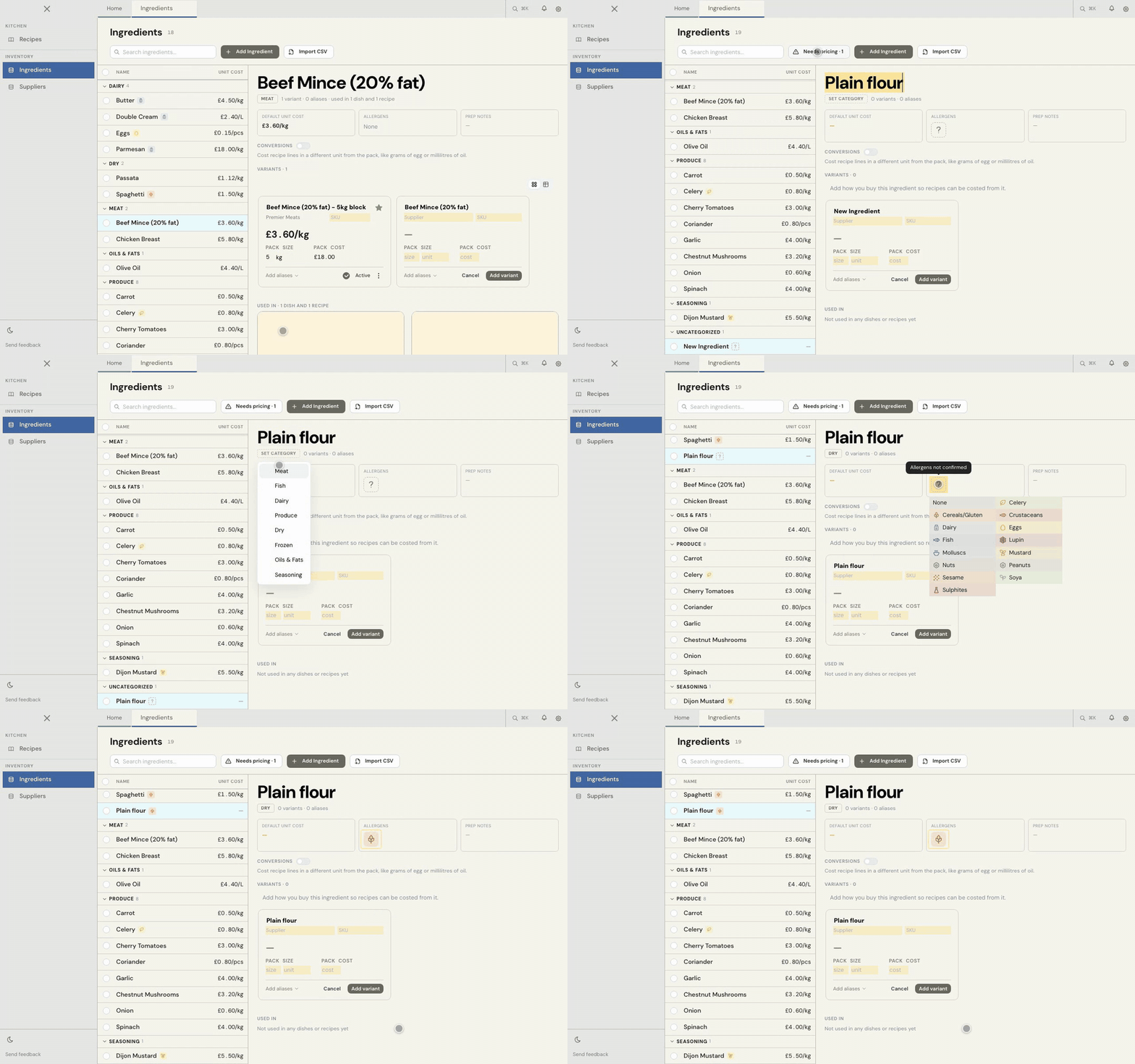
- Open Ingredients in the sidebar, or choose New ingredient on Home.
- Choose Add Ingredient.
- Type the name and press Enter.
- Choose Set category and pick one.
- Click the question mark under Allergens and pick what applies, or None.
2. Add its first variant
This is the step that gives the ingredient a price.
- A new ingredient opens with a blank card under Variants. Its name is filled in from the ingredient, and you can change it.
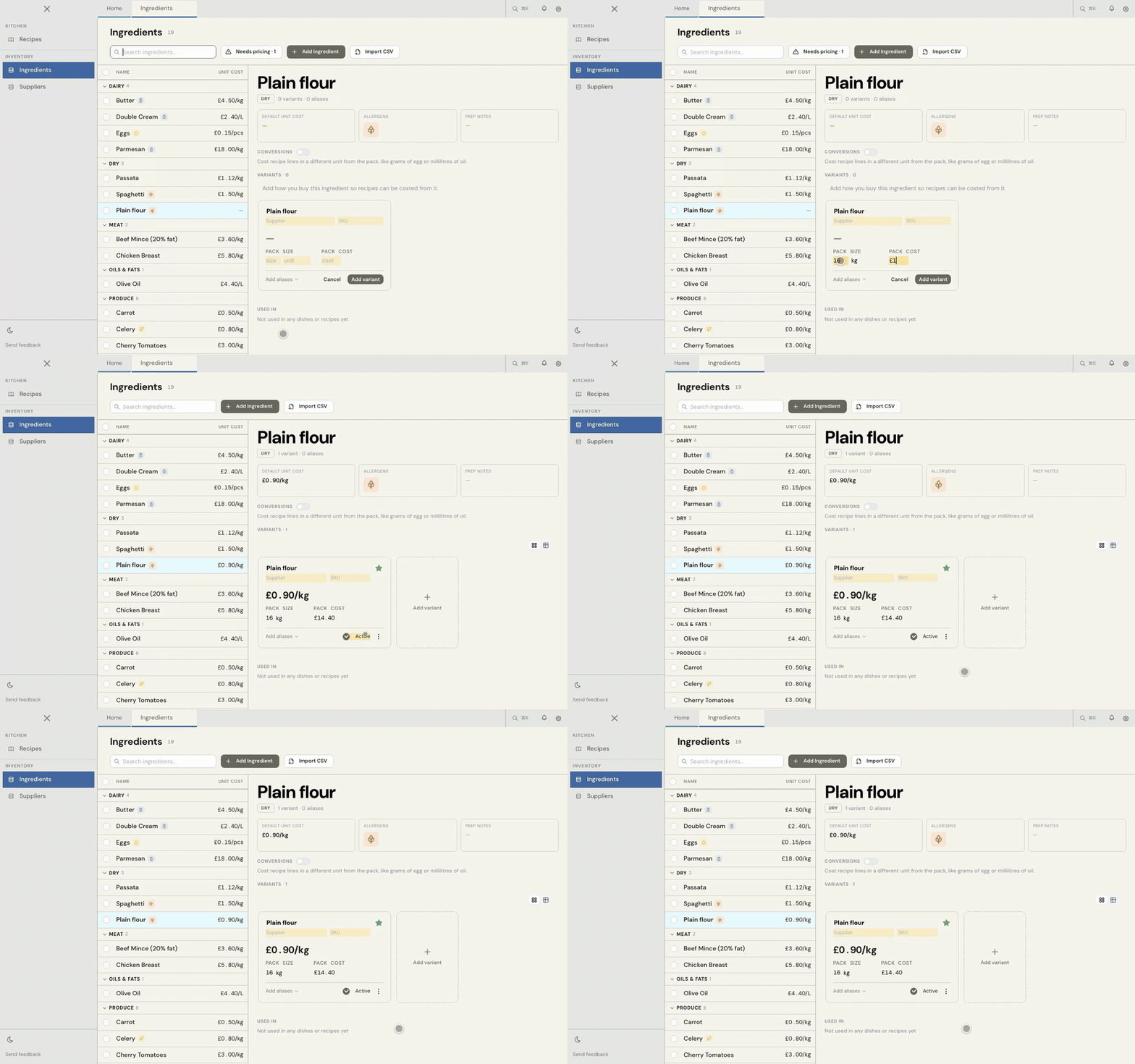
- Add the Supplier if you want to record one, then enter the Pack size, its unit, and what you pay under Pack cost.
- Choose Add variant, or press Enter in the price field.
If something is missing, the card tells you what's still needed. Nothing is saved until you add the variant.
Example: a 16 kg sack of flour at £14.40. Enter 16, kg and 14.40, and Cuisson shows a unit cost of £0.90/kg.
3. Check the result
The ingredient's Default unit cost now shows a price, and the same figure appears beside its name in the list. If an ingredient still shows a dash, it doesn't have a priced variant yet.
The Needs pricing button in Ingredients takes you through anything without a price, one ingredient at a time.
4. Use it in a recipe
In a recipe's Ingredients block, type the quantity and the ingredient, such as 200 g @plain flour, then press Enter to pick it and Enter again to skip the prep note. Cuisson costs that line from the default variant, and when the price changes, the recipes that use it update too.
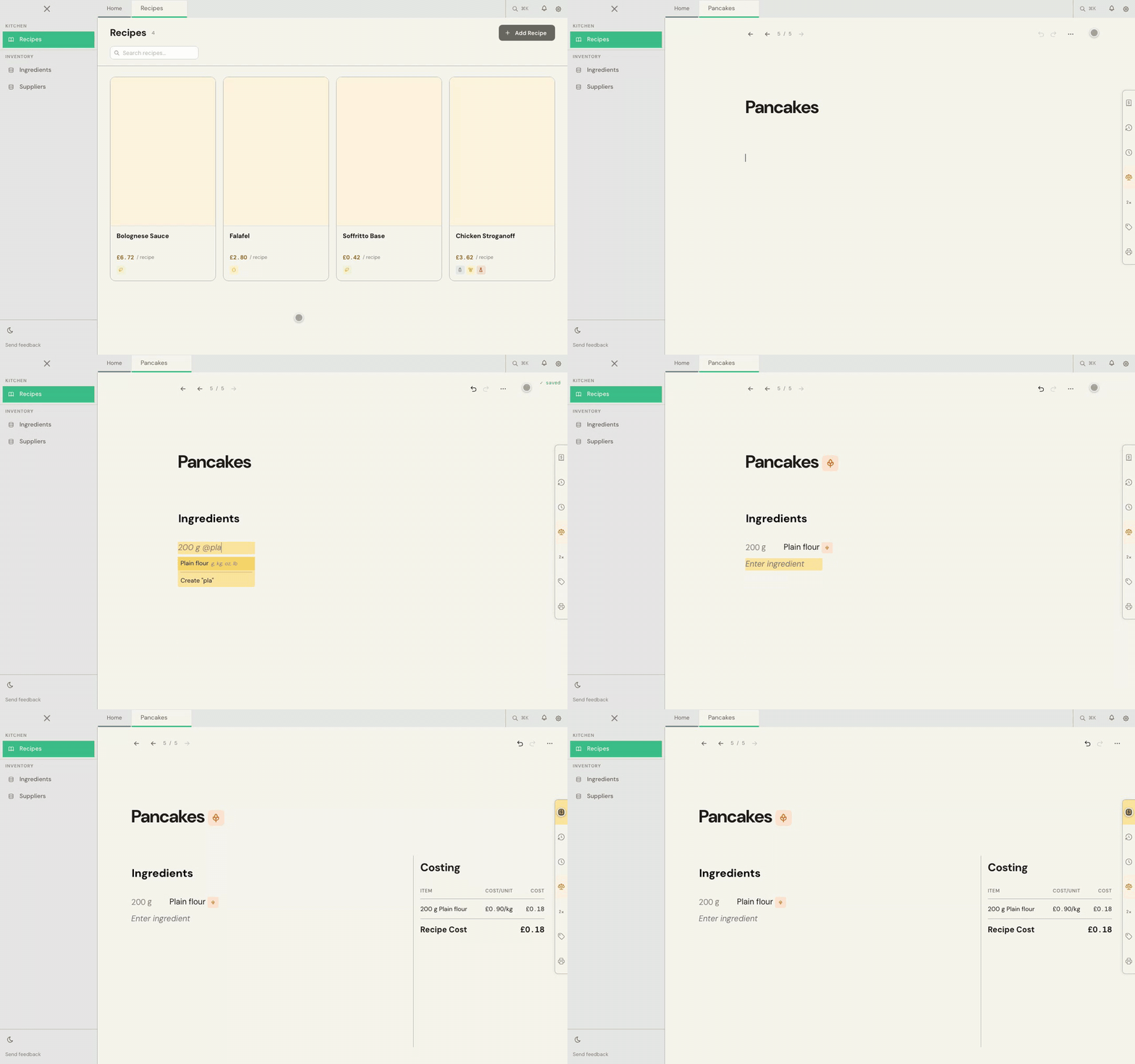
See Creating your first recipe for the full walkthrough.
Next steps
- To write "1 bottle" or "1 bag" in a recipe, see Use your own kitchen units with aliases.
- To cost grams of egg against eggs bought by the tray, see Cost a recipe in a different unit with conversions.
Adding a lot at once
You don't have to enter everything by hand. Import ingredients on Home brings in a spreadsheet, and Cuisson shows you what it found so you can check it before anything is saved.
Common problems
My ingredient shows a dash instead of a price
It has no priced variant yet. Open the ingredient and fill in the card under Variants.
My recipe's cost is missing or incomplete
At least one ingredient in the recipe has no price or no quantity. Open the Alerts panel on the recipe to see which.
I buy the same thing from two suppliers
Keep one ingredient and add a second variant, rather than creating a second ingredient. Your recipes stay the same, and you choose which variant is the default.
I need more help
Use Send feedback in the app, or email beta@kitchendocs.co.uk with what you were trying to do.